
 doc2.0
1.4. Hosted Fields
Introduction
In a regular payment form the card number, expiry date and CVV live in the DOM of the Connecting Party page: every script on the page can read them (including third-party ones — analytics, chat widgets, tags), they travel to the Connecting Party server and end up in its logs. Any vulnerability on the page, or a single compromised third-party library, means a card data leak.
Hosted Fields separates the fields from the page by origin. Each card field is a dedicated iframe loaded from the GitPay domain: its content is not accessible to the Connecting Party page code nor to the Connecting Party server. Card data goes straight from the iframe to GitPay and is exchanged there for a hostedFieldsToken — a short-lived single-use string the card cannot be reconstructed from.
This page describes how to embed such fields into a payment page, obtain a hostedFieldsToken and process a payment with it, without passing card data through Connecting Party systems. The scheme has four practical implications.
- Card data never enters Connecting Party systems
Not the DOM, the page javascript, the requests to the Connecting Party server, or its logs. This significantly reduces PCI DSS scope.
Note
The applicable Self-Assessment Questionnaire (SAQ) is to be agreed with a QSA — it depends on more than the card data collection method alone.
- The Payer stays on the Connecting Party page
Unlike a redirect to a payment page or a full-page GitPay form, checkout is not interrupted: there are no redirects, the browser address does not change, and the Pay button belongs to the Connecting Party page.
- Layout and field placement remain under Connecting Party control
The SDK creates the fields in exactly the div elements specified in the configuration, and knows nothing about how they are arranged. The containers are styled with the Connecting Party page’s own css, with no restrictions; the text inside the field is styled through the SDK, see Appearance.
- The server side changes in one parameter
Only the hostedFieldsToken arrives from the browser to the Connecting Party server. The Connecting Party server must still initiate the transaction itself — the token only replaces the card parameters in that call, it does not process a payment on its own. The payment is processed with the same server-to-server call as without Hosted Fields — for example a Sale, but several other calls accept the token as well: the card parameters — credit_card_number, expire_month, expire_year, cvv2 — are replaced with a single hosted_fields_token parameter. The remaining order parameters (amount, currency, client_orderid, order_desc, Payer address and email) are sent unchanged. See Step 3 for the full list of calls that accept the token.
What to Obtain from GitPay
ENDPOINTID and MERCHANTLOGIN in the examples are placeholders. Real values are provided by GitPay on onboarding, independently for the sandbox and the production environment.
Parameter |
Description |
|---|---|
Endpoint ID |
Identifier of the Endpoint the payment is processed on. Used in the URL of server calls and passed on SDK initialization as endpointId. |
Merchant login |
Merchant login provided by GitPay. Sent as oauth_consumer_key when signing requests. The Endpoint must belong to this login. |
RSA key pair |
Needed for signing with OAuth 1.0a RSA-SHA256, the method used in the examples on this page. Two keys generated together, one private and one public: the private key signs the requests and must be kept secret from everyone — it never leaves the Connecting Party server; the public key is sent to the support manager and is used to verify that a request was signed with the respective private key. This is one of the supported signature methods — others, for example OAuth HMAC-SHA1, use a control key instead of a key pair; see Request Authentication Methods. |
SDK script URL |
Where the browser loads the SDK and the card fields from: https://gate.gitpay.tech/sdk/hosted-fields/latest/index.js for production, https://sandbox.gitpay.tech/sdk/hosted-fields/latest/index.js for the sandbox. |
The keys are generated with a Key-Pair-Factory tool or OpenSSL, see Generating Key Pair. The signing procedure is described in OAuth RSA-SHA256.
Warning
Tokenization Flow
Three parties take part: the Payer, the Connecting Party — its checkout page and its server — and GitPay — the card fields it embeds as iframe elements inside the Connecting Party page, and the server behind them. The checkout page and the card fields both live in the Payer’s browser but belong to different origins, which is what keeps the card data out of reach of the page. The diagram below illustrates the flow on the example of a Sale call — see (14) for the other calls the same token works with.
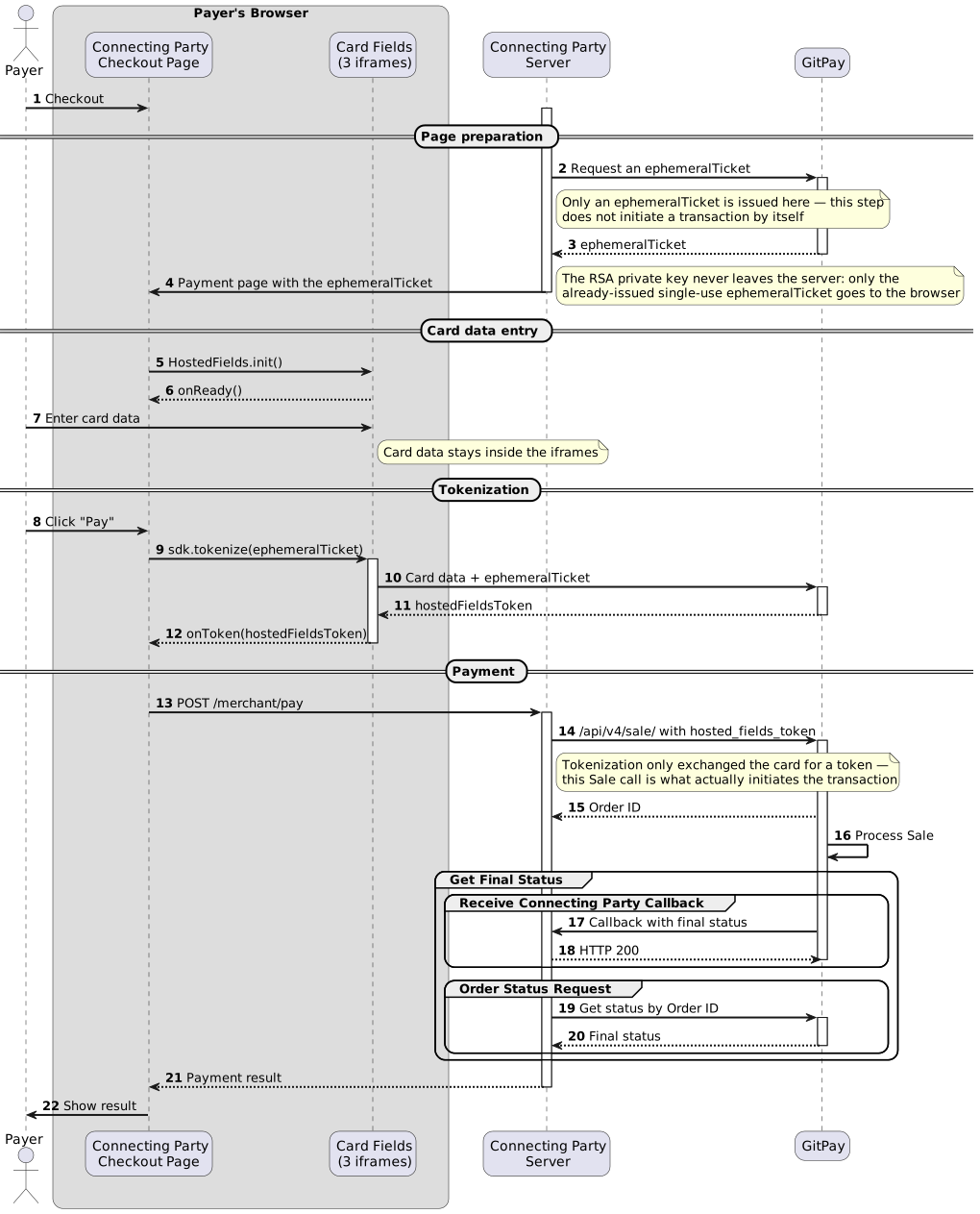
The same flow as an interactive diagram — step by step, with the request and the response of each step:
Integration
Reference merchant integrations are published on GitHub — the same payment, the same screens, the same flow, differing in the server stack and in whether the page is plain javascript or React: PHP, Node.js (Express), Python (Flask), .NET (ASP.NET Core), Go, Ruby (Sinatra), Java (Spring Boot), Kotlin (Ktor) and Rust (axum), plus React pages on Next.js and on Go. They cover all three steps below, the OAuth 1.0a signature included, and are a working starting point for your own.
Step 1. Obtain an ephemeralTicket
The ephemeralTicket is issued for a specific Endpoint, lives for 15 minutes and is consumed by a single tokenization. The Connecting Party server requests it with the /api/v4/tokenize/create-ephemeral-ticket call: the URLs, the request, the response and the errors are described there. The request is signed the same way as other server calls — in the examples here with OAuth 1.0a RSA-SHA256; other signature methods are supported as well, see Request Authentication Methods.
The ephemeralTicket is then embedded into the page being served — into a javascript variable or a data attribute. It is safe to expose in the browser: it allows exactly one tokenization on the given Endpoint, after which it is withdrawn.
Warning
Issue a new ephemeralTicket for every payment attempt. It is not a session credential and must not be cached, reused between Payers, or handed out to a page that is not about to take a card. The key that signs this very request is a different thing and stays on the server, see the warning above.
Warning
The clock of the Connecting Party server must be accurate: oauth_timestamp outside the permitted window (10 minutes by default) is rejected, and a repeated oauth_nonce is rejected as well.
Step 2. Fields and Tokenization
Markup: an empty div per field, the payment button, and an element for the error message. The hf-field class should be present in the markup from the start — the SDK sets it as well, but until the iframe loads the container would otherwise have zero height and the layout would jump. The payment button starts disabled and is enabled from onReady.
<label for="cardNumber">Card number</label>
<div id="cardNumber" class="hf-field"></div>

<label for="expiryDate">Expiry date</label>
<div id="expiryDate" class="hf-field"></div>

<label for="cvv">CVV</label>
<div id="cvv" class="hf-field"></div>

<button id="pay" type="button" disabled>Pay</button>
<p id="formError" class="form-error"></p>

<script src="https://sandbox.gitpay.tech/sdk/hosted-fields/latest/index.js"></script>
The script URL carries no parameters. The fields build the tokenization address themselves — from their own address, the endpointId, and the context path of the installation, which travels inside the ephemeralTicket. None of it comes from the init options, so a value taken from page javascript cannot redirect the card data, see Restrictions. GitPay rejects a ticket issued on another installation (error 4003).
Note
The script tag above is synchronous and placed at the end of <body>, so HostedFields is available to the next <script> immediately. For async or defer loading see Loading the SDK.
/* the field container is a regular element of the Connecting Party page */
.hf-field {
    height       : 48px;
    box-sizing   : border-box;
    border       : 1px solid #d5dae1;
    border-radius: 8px;
    background   : #fff;
}
.hf-field iframe  { display: block; width: 100%; height: 100%; border: 0; }
.hf-field--focus  { border-color: #2563eb; box-shadow: 0 0 0 3px rgba(37, 99, 235, .18);
                    outline: none; }
.hf-field--filled { border-color: #b9c0ca; }
.hf-field--error  { border-color: #dc2626; }

.form-error { margin: 4px 0 0; font-size: 12px; color: #dc2626; }
Note
.hf-field–error is set and removed by the SDK itself — on every field, on a failed tokenization — so the page only has to style it. See State Classes on the Container.
Initialization and result handling.
//embedded by the Connecting Party server when serving the page
const ENDPOINT_ID   = 'ENDPOINTID';  //Endpoint identifier provided by GitPay
const EPHEMERAL_KEY = '...';         //single-use ephemeralTicket from Step 1

const FIELD_STYLE = {
    input      : {fontFamily: 'Helvetica, Arial, sans-serif', fontSize: '16px', color: '#1f2937',
                  padding: '0 13px'},
    placeholder: {color: '#9aa4b2'},
    focus      : {outline: 'none'}
};

const payButton = document.getElementById('pay');

const sdk = HostedFields.init({
    endpointId: ENDPOINT_ID,
    fields    : {
        cardNumber: {type: 'pan', placeholder: '1234 1234 1234 1234', style: FIELD_STYLE},
        expiryDate: {type: 'exp', style: FIELD_STYLE},
        cvv       : {type: 'cvv', style: FIELD_STYLE}
    },
    onReady: () => {payButton.disabled = false;},
    onToken: sendHostedFieldsTokenToServer,
    onError: showError
});

payButton.addEventListener('click', () => {
    clearErrors();
    payButton.disabled = true;               //one tokenization per ephemeralTicket
    sdk.tokenize(EPHEMERAL_KEY);
});

//the hostedFieldsToken is received - send it to the Connecting Party server, Step 3;
//showPaymentResult is the Connecting Party page code displaying the result to the Payer
function sendHostedFieldsTokenToServer(hostedFieldsToken) {
    fetch('/merchant/pay', {
        method : 'POST',
        headers: {'Content-Type': 'application/x-www-form-urlencoded'},
        body   : new URLSearchParams({hosted_fields_token: hostedFieldsToken})
    }).then(response => response.text()).then(showPaymentResult);
}

//onError receives a HostedFieldsError: message and tip are for the log,
//payerMessage is the only part safe to show to the Payer - and it is not always present
function showError(error) {
    console.error(`[HostedFields] ${error.code}: ${error.message}`, error.tip, error.field);
    document.getElementById('formError').textContent =
        error.payerMessage || 'The payment could not be completed. Please try again.';
    payButton.disabled = false;
}

function clearErrors() {
    document.getElementById('formError').textContent = '';
}
Warning
A failed tokenization spends the ephemeralTicket only if GitPay has already accepted the card data. After any onError in the 4xxx range, request a new ephemeralTicket (Step 1) before letting the Payer press Pay again — reloading the page with a fresh key is the simplest way to do it.
The SDK is loaded from the GitPay host and must not be copied to the Connecting Party page’s domain: it derives from its own script address where to load the card fields from and whose messages to accept. A copy hosted on the Connecting Party page’s domain would create the fields on that same domain — that is, the very form the integration is meant to replace — so init refuses to start in that case (error 1009).
Note
If CSP is configured on the page, allow the GitPay domain in script-src (loading index.js) and in frame-src (the fields themselves).
Step 3. Payment with the hostedFieldsToken
The hostedFieldsToken is placed into a regular payment request in the hosted_fields_token parameter — for example a Sale; the calls that accept the token are listed below. The card number, expiry date and CVV are not sent — they are not available to the Connecting Party, and the Payment Gateway takes them from the token. The request is signed as usual for the chosen call. The parameter, the rules the request must follow and a request example are described on the page of each call.
The token is accepted in place of the card parameters by the following calls.
Call |
Parameter |
Notes |
|---|---|---|
/api/v4/sale/ |
hosted_fields_token |
|
hosted_fields_token |
||
hosted_fields_token |
||
/api/v4/transfer/ |
destination-hosted-fields-token |
Receiver card only, and only for deposit2card (D2C). destination_expire_month and destination_expire_year must not be sent. |
The response is asynchronous: it carries the Order ID, but not the payment status, see Async-Response. The final status is requested with a separate Order Status Request or delivered as a Connecting Party Callback.
Note
Tokenization alone does not initiate a transaction — the Connecting Party server must still send a Sale (or another call from the table above) to actually process the payment.
SDK Reference
The SDK exposes a single object, HostedFields, with a single method, init.
Loading the SDK
window.HostedFields appears when the script has executed, and the SDK announces itself in two more ways so that async and defer loading do not require polling. Pick whichever fits the page.
Way |
When to use |
|---|---|
Synchronous <script src> |
The simplest one. Place the tag at the end of <body>: HostedFields is available to the next <script> immediately. |
window.onHostedFieldsReady |
Define this function before the SDK script tag; the SDK calls it once with the API object. Works with async and defer. |
hosted-fields:ready event on document |
For several independent listeners, or for a CSP without unsafe-inline. The API object is in event.detail. |
<script>
  window.onHostedFieldsReady = function (HostedFields) {
    var sdk = HostedFields.init({/* ... */});
  };
</script>
<script src="https://sandbox.gitpay.tech/sdk/hosted-fields/latest/index.js" async></script>
<script>
  document.addEventListener('hosted-fields:ready', function (event) {
    var sdk = event.detail.init({/* ... */});
  });
</script>
<script src="https://sandbox.gitpay.tech/sdk/hosted-fields/latest/index.js" async></script>
Warning
The SDK must be loaded with a classic <script src> tag — synchronous, async, defer or inserted dynamically. It is not an ES module and is not published as an npm package: the origin of the card fields is derived from document.currentScript, which is null in a module or in a bundler build (error 1006).
Note
init waits for DOMContentLoaded internally, so it may be called from the <head> — the field containers do not have to exist yet at that moment.
HostedFields.init(options)
Parameter |
Required |
Description |
|---|---|---|
endpointId |
yes |
Endpoint identifier. Without it init throws 1001 immediately instead of deferring the error until the payment button is pressed. |
fields |
yes |
{<div id>: <field description>} — which fields to create and in which containers. A field description is either a type string (‘pan’) or an object {type, placeholder, style}. A pan field is mandatory (1008). |
onToken |
yes |
function(hostedFieldsToken) — tokenization succeeded. |
onError |
yes |
function(error) — tokenization or field loading failed; error is a HostedFieldsError. |
onReady |
no |
function() — called once when every field iframe has loaded. The natural place to enable the payment button. |
loadTimeout |
no |
How long to wait for a field to load, in milliseconds. Default 10000; exceeding it produces 2001 or 2002. |
init may be called only once per page; a second call throws 1010 until destroy() is called. The method returns an object with three methods and one promise.
Member |
Description |
|---|---|
tokenize(ephemeralTicket) |
Asks the pan field to collect the values of all fields and exchange them for a hostedFieldsToken. ephemeralTicket is the single-use key from Step 1. The result is delivered to onToken or onError. A second call while the first is still running is ignored with warning 2008; a response that does not arrive within 30 seconds produces 2005. |
setStyle(divId, style) |
Changes the styling of an already created field on the fly. An unknown divId is reported as warning 5003. |
destroy() |
Removes the iframe elements, the state classes, the ARIA attributes and the injected stylesheet, and unsubscribes from messages. Idempotent; tokenize and setStyle after it are ignored with warning 5006. After destroy() a new init is allowed. |
ready |
A promise fulfilled at the same moment as onReady and rejected with the first field loading error. An alternative to the callback, convenient with await. |
Note
ready is created whether or not it is used. If the fields fail to load and nothing is attached to it, the browser console will additionally show an unhandled promise rejection next to the onError call — attach a .catch() if that noise is unwanted.
Field Types
Type |
Default placeholder |
Input and formatting |
|---|---|---|
pan |
Card number |
|
exp |
MM / YY |
|
cvv |
CVV |
Digits only, 4 maximum. |
The pan field is mandatory: it initiates the tokenization and collects the values from its neighbours. Exactly four values are sent to GitPay: pan, expMonth, expYear, cvv. No other field types are provided by the SDK — the cardholder name, email and other order data remain regular fields of the Connecting Party form and are sent from the Connecting Party server in the Sale request.
A non-empty placeholder in the field description overrides the default value. An unknown type throws 1004.
State Classes on the Container
The state of a field is only visible to its iframe: focus and input happen in a foreign window, so :focus-within and :has() do not reach the Connecting Party page. Instead, the SDK toggles classes on the container.
Class |
Description |
|---|---|
hf-field |
Always — set when the iframe is created. Should be present in the markup as well. |
hf-field–focus |
The field is focused. |
hf-field–filled |
Something has been entered into the field. |
hf-field–error |
Tokenization failed. Set by the SDK on every field at once, because a tokenization error is not attributed to a particular one; removed on the next successful tokenization. |
The SDK also sets role=”group” and an aria-label (Card number, Expiry date, CVV) on each container, and aria-invalid alongside hf-field–error.
Note
To keep the field keyboard-accessible when the page defines no focus style of its own, the SDK injects a default focus outline for .hf-field–focus. The rule is inserted as the first stylesheet in <head>, so any page rule of the same specificity overrides it. If you draw your own focus indicator, add outline: none to your –focus rule; do not remove the indicator without a replacement.
Note
Custom modifiers of your own (for example hf-field–invalid) are added and removed by the Connecting Party page; the SDK does not touch them.
Appearance
Customization is split in two by the domain boundary.
The container and the iframe element belong to the Connecting Party DOM. Size, border, background, corner radius, shadow, :hover, transitions and animations, resize behaviour — plain css of the Connecting Party page, with no restrictions here. The field page is deliberately transparent, with no background or border of its own.
The content of the field lives in the GitPay window. Connecting Party css does not reach inside; only what is passed through the SDK in the style sections gets in.
Style Sections
Section |
Description |
|---|---|
input |
Inline style of the <input> itself. |
placeholder |
The ::placeholder rule inside the field. |
focus |
The :focus rule inside the field. |
Allowed Properties
Only cosmetics is allowed inside the field.
Group |
Properties |
|---|---|
Colour |
color, backgroundColor, caretColor |
Font |
font, fontFamily, fontSize, fontStyle, fontWeight, fontVariant, fontVariantNumeric |
Tracking and line |
letterSpacing, wordSpacing, lineHeight |
Text |
textAlign, textTransform |
Padding and border |
padding, paddingTop, paddingRight, paddingBottom, paddingLeft, border, borderColor, borderRadius, outline |
Other |
transition |
A property name is accepted both in camelCase and in kebab-case: fontSize and font-size are the same thing.
Warning
A value must be a string and must not contain ;, {, }, <, >, url( or expression(. A property failing the check is dropped with warning 5001 or 5002 in the browser console; the rest are applied and the field keeps working.
Examples
Basic Styling
const FIELD_STYLE = {
    input      : {
        fontFamily        : '-apple-system, "Segoe UI", Roboto, Helvetica, Arial, sans-serif',
        fontSize          : '16px',
        fontVariantNumeric: 'tabular-nums',
        color             : '#1f2937',
        caretColor        : '#2563eb',
        padding           : '0 13px'
    },
    placeholder: {color: '#9aa4b2'},
    focus      : {outline: 'none'}
};

const sdk = HostedFields.init({
    endpointId: ENDPOINT_ID,
    fields    : {
        cardNumber: {type: 'pan', placeholder: '1234 1234 1234 1234',
                     style: {...FIELD_STYLE, input: {...FIELD_STYLE.input, letterSpacing: '0.5px'}}},
        expiryDate: {type: 'exp', style: FIELD_STYLE},
        //CVV is short - centred it looks better
        cvv       : {type: 'cvv',
                     style: {...FIELD_STYLE, input: {...FIELD_STYLE.input, textAlign: 'center'}}}
    },
    onReady: () => {payButton.disabled = false;},
    onToken: sendHostedFieldsTokenToServer,
    onError: showError
});
Field States
Focus, filled state and error are drawn by Connecting Party css through the container classes — the border and the shadow are laid out as usual. The base .hf-field, –focus, –filled and –error rules are defined in Step 2; :hover and transitions are added here.
.hf-field {
    height       : 48px;
    box-sizing   : border-box;
    border       : 1px solid #d5dae1;
    border-radius: 8px;
    background   : #fff;
    transition   : border-color .15s, box-shadow .15s;
}
/* :hover is more specific, without :not() it would repaint the focused field border back to grey */
.hf-field:hover:not(.hf-field--focus):not(.hf-field--error) { border-color: #b9c0ca; }
.hf-field--filled { border-color: #b9c0ca; }
.hf-field--focus  { border-color: #2563eb; box-shadow: 0 0 0 3px rgba(37, 99, 235, .18);
                    outline: none; }
.hf-field--error  { border-color: #dc2626; }
Highlighting After a Decline
The border is painted by Connecting Party css from the hf-field–error class the SDK sets, while the text inside the field is only reachable through setStyle. This is an extended version of showError / clearErrors from Step 2: repainting the input itself is added to the message below the form.
function showError(error) {
    console.error(`[HostedFields] ${error.code}: ${error.message}`, error.tip, error.field);
    document.getElementById('formError').textContent =
        error.payerMessage || 'The payment could not be completed. Please try again.';
    sdk.setStyle('cardNumber', cardNumberStyle('#dc2626'));
    payButton.disabled = false;
}

function clearErrors() {
    document.getElementById('formError').textContent = '';
    sdk.setStyle('cardNumber', cardNumberStyle('#1f2937'));
}

function cardNumberStyle(color) {
    return {
        input      : {...FIELD_STYLE.input, letterSpacing: '0.5px', color: color},
        placeholder: FIELD_STYLE.placeholder,
        focus      : FIELD_STYLE.focus
    };
}
Warning
setStyle overwrites the field styling completely: the previous inline style is dropped, and the ::placeholder and :focus rules are rebuilt from scratch based on what you pass — include every section you want to keep, not only the one that changed. The placeholder text itself (set via the field’s placeholder option) is untouched by setStyle.
Errors
onError receives a HostedFieldsError object — an Error subclass with a stable numeric code, so an integration reacts to error.code rather than to a text.
Property |
Description |
|---|---|
code |
Numeric code from the registry below. Stable: a code is never reused for another meaning. |
message |
Developer-facing description, in English. Not for showing to the Payer. |
tip |
What to check. Developer-facing as well. Filled in by the SDK from its own registry by code, not sent by GitPay. |
payerMessage |
The only part safe to show to the Payer, and only present for some errors — 3001 and 4004 carry one. Also filled in by the SDK, because GitPay messages are English-only. When it is absent, show your own generic text. |
field |
The div id of the field the error relates to, when it relates to one. |
String(error) gives [HostedFields] <code>: <message>.
Codes are grouped into ranges, and the range determines how the error reaches the integration.
Range |
Channel |
Meaning |
|---|---|---|
1xxx |
Thrown by init |
Configuration: wrong options or wrong loading. Happens before any iframe is created, and is a mistake in the integration rather than a runtime condition. The exception is 1005, which depends on the markup and therefore goes to onError. |
2xxx |
onError |
Environment and field lifecycle: loading, handshake, timeouts. |
3xxx |
onError |
What the Payer entered. Carries payerMessage. |
4xxx |
onError |
GitPay declined the tokenization. |
5xxx |
console.warn |
Diagnostics that do not stop the payment. Never reaches onError. |
Error Codes
Code |
Message |
What to do |
|---|---|---|
1001 |
endpointId is required |
Pass endpointId in the init options. |
1002 |
onToken must be a function |
Pass a callback as onToken. |
1003 |
fields must be a non-empty object |
Describe at least one field in fields. |
1004 |
unknown field type “X” for #divId |
Expected pan, exp or cvv. |
1005 |
element #divId not found |
The container is missing from the markup. Note that init already waits for DOMContentLoaded, so this is a real absence, not a race. |
1006 |
cannot detect script origin |
The SDK was loaded not as a classic <script src> — as an ES module or through a bundler, see Loading the SDK. |
1007 |
invalid segment: X |
The context path inside the ephemeralTicket is not a single path segment matching ^[a-z0-9-]{1,32}$. The ticket is malformed — obtain a new one, see Step 1. |
1008 |
pan field is not configured |
Tokenization is initiated by the pan field, so it cannot be omitted. |
1009 |
SDK is loaded from the merchant origin |
index.js was copied to the Connecting Party domain. Load it from the GitPay host, see Step 2. |
1010 |
init() has already been called |
Call destroy() before initializing again. |
1011 |
field endpoint/type query is missing |
Internal: an iframe of a card field was created by something other than the SDK. Reported in the console of the field, not through onError. |
2001 |
field #divId iframe failed to load |
The iframe never loaded within loadTimeout. Check the CSP frame-src and network access to the GitPay host. |
2002 |
field #divId loaded but sent no handshake |
Something loaded at that address, but it is not a card field — most often a 404 page. Check the SDK script URL. |
2003 |
field protocol version N is not supported |
The SDK and the field page are from different releases. Reload the page; if it persists, report it to support. |
2004 |
card fields are not loaded yet |
tokenize was called before the fields were ready. Enable the payment button from onReady. |
2005 |
tokenize timed out |
No response within 30 seconds. Let the Payer try again with a new ephemeralTicket. |
2006 |
field #divId became ready after the load timeout |
A warning-grade condition on a slow connection: increase loadTimeout. |
2007 |
payment token arrived after tokenize timed out and was discarded |
The ephemeralTicket has been spent, but the token came too late to be used. Request a new ephemeralTicket for the next attempt. |
2008 |
tokenize is already in progress |
The second Pay click. Disable the button until onToken or onError. |
3001 |
expiry date is incomplete |
The expiry date is entered partially. An incomplete value is not sent: 3 would otherwise be submitted as the year 2003. Carries a payerMessage. |
3002 |
field exp not found / field cvv not found |
The field is described in fields, but its container is missing from the markup, so the pan field has nothing to collect the value from. |
4001 |
ephemeral ticket expired or already spent |
The ephemeralTicket is older than 15 minutes or has already been used. Request a new one. |
4002 |
endpointId does not match the ticket |
The endpointId passed to init is not the one the ephemeralTicket was issued for. |
4003 |
segment does not match endpoint owner |
The ephemeralTicket was issued on another installation of GitPay. Request one on the installation the endpointId belongs to. |
4004 |
card data rejected by the platform |
The card did not pass the GitPay checks — a too short number, an expired card, a non-numeric CVV. Carries a payerMessage. The ephemeralTicket is spent, so a new attempt needs a new one. |
4900 |
The GitPay response as it is |
Any other decline of the tokenization. The text is a raw platform response: log it and show the Payer your own generic message, not this. |
5001 |
style property is not allowed: X |
Property X is outside the allowed list, see Appearance. The remaining properties are applied and the field keeps working. |
5002 |
style value is not allowed: X=Y |
The value is not a string, or it contains ;, {, }, <, >, url( or expression(. |
5003 |
setStyle: unknown divId “X” |
The divId does not match any key of the fields map. |
5004 |
container #divId already holds a field iframe |
init was called twice for the same container. The old iframe is removed. |
5005 |
malformed field_event message |
A symptom of a version mismatch between the SDK and the field page. |
5006 |
tokenize called after destroy() / setStyle called after destroy() |
The instance has already been destroyed; call init again to get a new one. |
Note
Whatever the code inside the 4xxx range, the ephemeralTicket is spent: obtain a new one before letting the Payer try again. What differs is what else to do — 4001 and 4900 mean retry, 4002 and 4003 are integration mistakes that a retry will not fix, and 4004 means the Payer has to correct the card.
Restrictions
The restrictions below are not a shortcoming but the very reason the scheme exists: everything listed would either take card data outside the GitPay window or allow a genuine field to be replaced with a counterfeit one. If any of them blocks a scenario, contact GitPay support instead of working around it.
Not available |
Reason |
|---|---|
Reading the field value, whole or character by character |
This is the card data itself: the card number, expiry date and CVV. Only the event name (focus, blur, input) and the “field is empty” flag leave the field. |
Receiving the input content in a custom handler (keydown, input, change) |
A handler with access to the value leaks the card number digit by digit — the isolation is bypassed without a single hacking attempt. The input event is delivered as a state class change, but without the value and without its length. |
Setting the address the tokenization is sent to |
The field derives it from its own address, the endpointId it was loaded with, and the context path carried inside the ephemeralTicket — never from the init options. The context path must be a single ^[a-z0-9-]{1,32}$ path segment, so it cannot point the request at another host. Otherwise an XSS on the Connecting Party page would be enough to divert a card to a foreign server. |
Serving the SDK from the Connecting Party domain |
A same-origin copy would create the fields on the Connecting Party domain — the very form the integration replaces. init refuses to start (1009). |
Inside the field: positioning, dimensions, opacity, visibility, clip, transform, negative margins |
These properties hide the genuine field and put a foreign one in its place: the Payer sees a regular form and enters the card into a counterfeit. The size and position of the field itself are set by the container, where there are no restrictions. |
Loading an external resource inside the field (url(…)) |
A request to an external address from the window where the card is entered is a ready-made leak channel. |
Modifying or reading the internal markup of the field |
It is a GitPay document and may change at any moment; its structure must not be relied upon. |
Reaching the field content through iframe.contentDocument or frames[…] |
It is a window of another domain: the browser denies access (SecurityError) and the restriction cannot be bypassed. The fields are managed through the object returned by init. |
Performing two tokenizations with one ephemeralTicket |
The key is single-use; a new payment attempt requires a new one. |
Troubleshooting
Error codes are listed in Error Codes. The table below covers the symptoms that come without one.
Symptom |
Troubleshooting |
|---|---|
A server call is rejected with error-id=… and message=…, 401 |
The request failed the signature check or authentication. Most common: the server clock is outside the oauth_timestamp window, oauth_nonce is reused, the Endpoint does not belong to the login from oauth_consumer_key, or a wrong public key is configured on the Endpoint. See message for the reason and quote error-id to support. |
The signature is accepted, but create-ephemeral-ticket returns no ticket |
Check the endpointId and its settings on the GitPay side: tokenization must be enabled on this Endpoint, and the Endpoint must belong to the login the request is signed with. |
A Sale request is rejected with At most one of … should be set. |
The request carries a second source of card data next to hosted_fields_token — a card number, a temporary_card_record_id or a card_recurring_payment_id, see the rules on the page of the call, listed in Step 3. |
A Sale request is rejected with When ‘hosted_fields_token’ present … should not be set. |
expire_month, expire_year or cvv2 is still being sent. They come from the token and must be removed from the request. |
A Sale request is declined with a reference to the token |
The hostedFieldsToken has expired (5 minutes) or has already been spent — for example, the form was submitted to the server twice. Every payment requires its own tokenization. |
The fields do not appear, a script or frame loading error in the console |
The page CSP does not allow the GitPay domain: script-src is required for index.js and frame-src for the fields. |
HostedFields is not defined |
The initialization code runs before the SDK script has executed. With async or defer use window.onHostedFieldsReady or the hosted-fields:ready event, see Loading the SDK. |
[HostedFields] window.HostedFields is already defined |
The SDK script is included twice on the page. Leave one tag. |
The layout jumps on page load |
The containers have no hf-field class in the source markup: they have zero height until the iframe is created. |
The focus ring looks foreign |
It is the SDK’s default focus outline. Override it in your own .hf-field–focus rule — but replace it, do not just remove it, see State Classes on the Container. |
Note
When investigating an issue, keep in mind that the field content is not available to the Connecting Party either: card values will not appear in the console or in the page debugger under any settings — this is the expected behaviour, not a malfunction.